Triago · Your administrative assistant

Run a construction business? Your day belongs on the job site, not in your inbox.

Stop thinking about your emails.

What matters is up front. Your replies are drafted in your style. People who don't answer get a follow-up. Triago does the work, and Li-A sets it up for you.

Your day

We know how it goes.

You're on the job all day. The client is waiting on a quote, the supplier is waiting on your answer, and at night, your emails are still there. We saw it for 30 years on job sites, and we still hear it. You're not the problem: it's a lot for one person.

More than anything, we want to help. And if you have a team, Triago helps your people keep up: it replaces no one.

What Triago takes care of

What you told us. What Triago does.

The mess

“I don't even know where to start.”

One button, “Update my mailbox”, and Triago recognizes what's already sitting there and sorts it. Li-A then offers to clear it out one batch at a time, with the count right in the sentence. Nothing leaves your inbox without your yes.

What matters

“Emails slip through the cracks.”

Sorting puts what matters up front, with your own labels. When a reply comes in, you see it right away: your move.

Time

“I spend way too much time in there.”

Triago drafts your replies in your style. You read them over, tweak if you want, and send.

Follow-ups

“I forget to follow up.”

You put the “Triago - Follow up” category (Outlook) or the “Triago/Follow up” label (Gmail) on a sent email. Triago prepares the follow-up after the delay you choose, and stops as soon as the reply comes in.

What you see

No empty promises. Here's the screen.

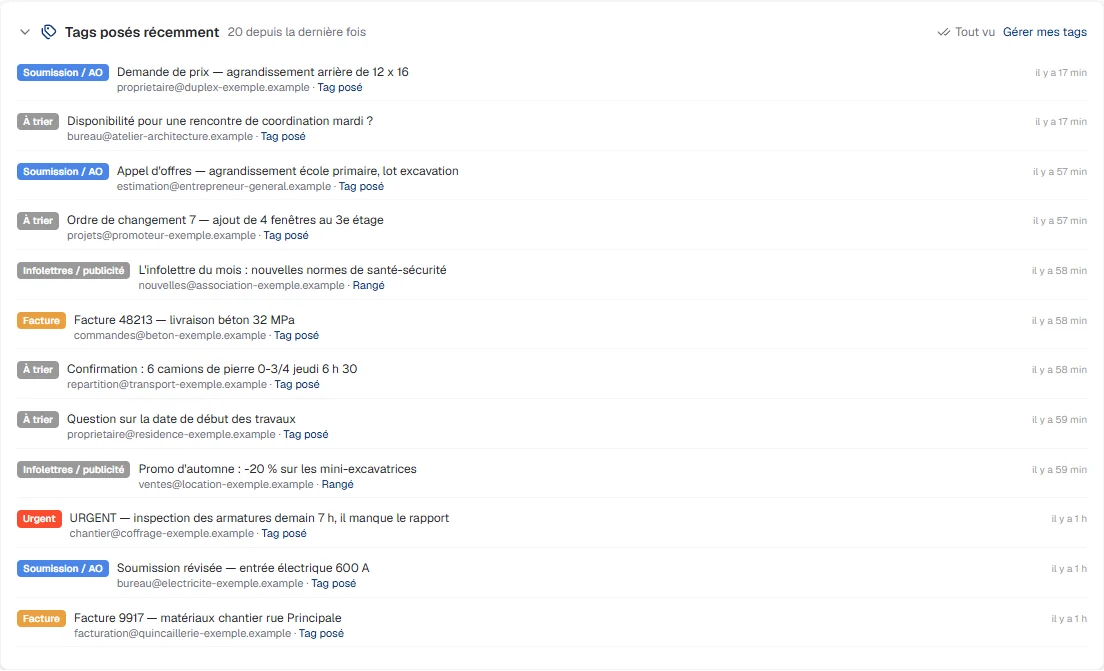
Triago's “Recently applied tags” list: twelve job-site emails sorted as Quote, Invoice, Urgent, To sort and Newsletters.
What matters, up front. Every email gets its label: quote, invoice, urgent. You see at a glance what's waiting for you.
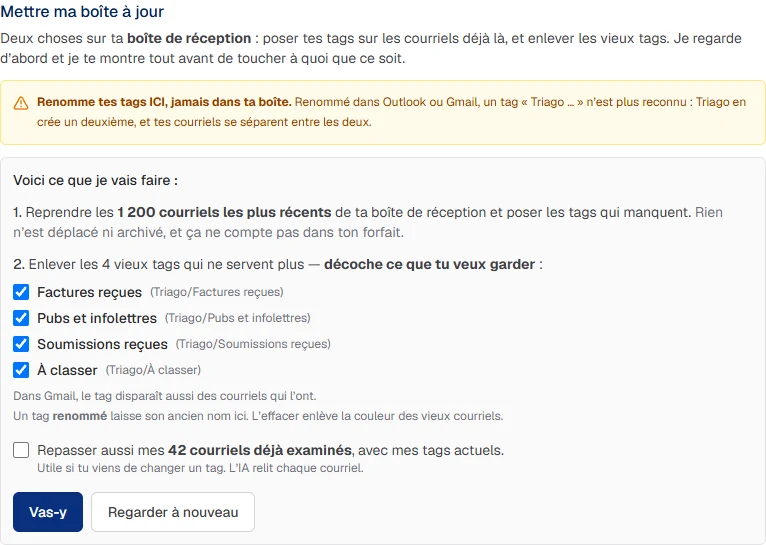
Triago's “Update my mailbox” panel: it explains what it will do and waits for your OK before touching anything.
The mess, spotted with one button. Triago tells you what it will do before doing it. Nothing moves without your yes.
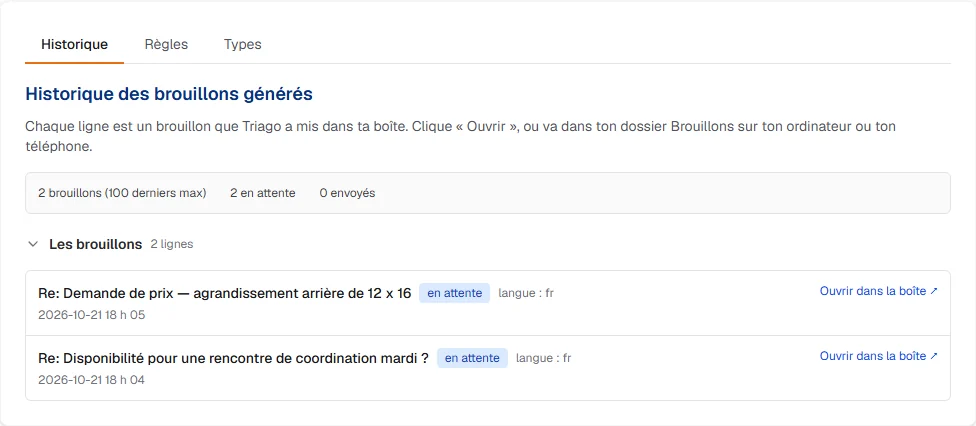
Triago's draft history: two prepared replies waiting, none sent.
Your replies, prepared. The drafts wait in your mailbox. You read, you adjust, you're the one who sends.

Screenshots from a demo account, with fictitious senders. Triago's screens are shown in French.

Control

Triago prepares. You hit send.

By default, your replies and your follow-ups are drafts. Nothing goes out without you, except what you've switched on yourself, label by label.

Your emails

Who sees my emails?

We don't read your emails. Our team only accesses the excerpts the service needs, access is restricted, and your connection tokens are encrypted with a key kept outside the database. The content goes to the United States for sorting and drafting.

Effort

Nothing to set up. Nothing to learn.

You create your account and connect your inbox, Outlook or Gmail: about ten minutes. Then you talk to Li-A in plain words, and she programs Triago. The more you sort, the more Triago learns how you work.

The receptionist

Rather have us walk you through it?

For now, Jean-François's AI assistant only calls in French. If French works for you: on the French sign-up page, a business leaves its number and checks “call me”. You confirm your number with a code sent by text, then the assistant calls you back on a weekday, during the day, and sends you a follow-up email. You say “no” or “don't call me again”: it's noted, we don't call again.

Request a call in French

Your questions

What people ask us before trying it.

Which email inboxes can Triago sort?

Business Outlook 365, Hotmail, Outlook.com and Live, as well as Gmail. One person can connect as many inboxes as they want. A Vidéotron, Bell or iCloud inbox doesn't connect directly: have it forwarded to a Gmail or Outlook account, and Triago sorts it from there.

What happens if I go over my plan?

Your plan covers 1,200 actions a month: a sorted email, a draft, a follow-up or a question to Li-A. Nothing stops when you go over. The counter warns you at 80%, and you add a block when you click, starting at $20 a month for 250 actions. Never an automatic charge. Prices as of October 2026, full details at triago.dev/en/pricing.

How do I cancel during the free month?

You cancel in your account before the 30 days are up, and you pay nothing. Your card is requested at the start, but nothing is charged during the trial.

Who can see my emails?

We don't read your emails. Our team only accesses the excerpts the service needs, and that access is restricted. Your connection tokens are encrypted with a key kept outside the database. The content goes to the United States for sorting and drafting.

Does Triago work in English?

Yes. The website, sign-up, emails and Li-A follow your account's language, French or English. A few labels on screen are still in French.

What if it doesn't work for me?

You connected your inbox, you tried it, and it isn't working for you? Ask Li-A anytime, the AI agent built into Triago: she walks you through setting up your inbox, in English. And if you don't continue, you cancel before the end of the free month and pay nothing.
Price

$1.37

a day on a one-year plan, your first year

$500 billed after your free month · $1,000 a year after that · Canadian dollars, taxes extra

An administrative assistant costs $40,000 to $50,000 a year.

Every new subscriber gets one free month to try it on their real inbox. Your card is requested to start; nothing is charged for 30 days.